
Saltar al contenido

How to add device on VMS Software?

Firstly, you can find device serail number follow these steps.

Right click the mouse→【Main Menu】→【Advanced】→【Version】
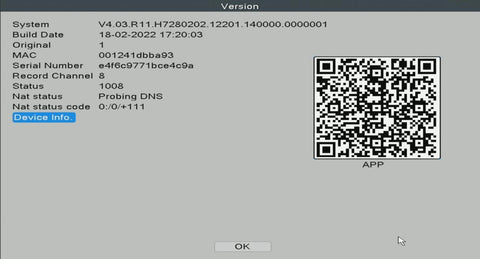
Serial Number: Enter device Serial Number

Username: admin (Default)

Password: Just leave it blank as default (But you need to fill in your own password if you have changed the password before).

Click here to download VMS

Open VMS PC client software after installation.
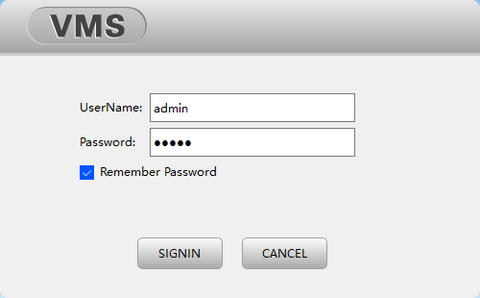
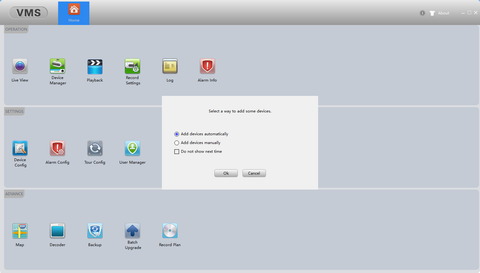
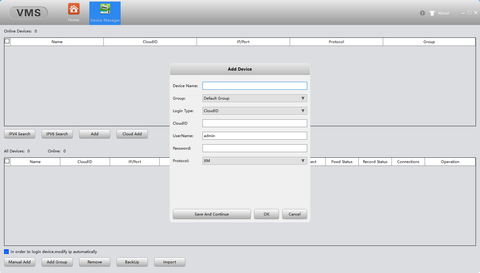
Click [Device Manager] and choose [Add devices automatically] to add the device.
If you have already keep your device and your pc at same network, then you can click IPV4/6 Search to detect device to add.
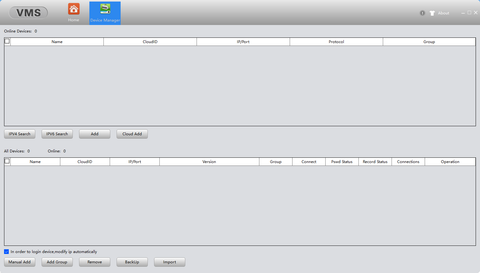
Or click Clould Add, fill with serial number and passwrod to add.
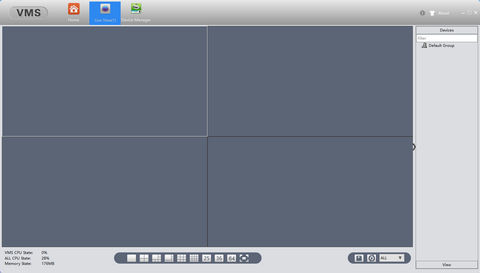
Finally, you can click Live View, double click the device name on the right side to watch.
Publicación anterior
Publicación siguiente

I18n Error: Missing interpolation value "contar" for "{{ contar }} comentario"

03 Apr 2024 MOHAMMED ALDHAHARI
Hello, I had two types of camera companies, one is your company and the other is Hikvision. I have Hikvision NVR and everything is good. Now I replaced the Hikvision camera and also the NVR to your company, but I encountered a problem with displaying the cameras on the browser. Not all of them appear, even though they appear perfectly on the phone application. And also on NVR
30 Jan 2024 Geert Datema

What is the default admin password for the VMS PC Client application? I see five dots, burt can’t change it.

05 Jan 2024 Sinisa

I recently purchased a WiFi solar powered battery camera and connected it to my network. The camera works fine when I use the IcSee app, but when I connect to it using the VMS Windows program, the system says that the camera is offline. If I open the IcSee Android app and start the camera, then the camera is also accessible in the VMS program.

I am unable to find the “Sleep Settings” option in the camera settings. Is there another way to wake the camera from sleep mode in VMS?

The camera is a solar powered battery camera. Is there a setting in VMS that I need to enable to allow the camera to wake up from sleep mode when it is powered by solar energy?

15 Dec 2023 Nick

Hi Gerry
Open the case from your NVR and search for reset button
I will try next days opening my NVR and see if there is a way resetting all system to factory default

20 Nov 2023 Samuel

I bought techange camera kit I did all the installations well and boom the thing was live.Here comes a big mistake, forgetting techange device password is like committing a crime!I tried so many times to get help from techange but nothing upto date.The only thing they told me is that they can’t help but I should physically reset it.I told them I’m out of my country for work and the only way I use to access my device is via app but they totally refused to help.
Now it’s 1 year since without accessing my device.
I would say to everyone out there there is no point of purchasing their products since they don’t offer help at any point.
I’m frustrated and so mad 😡

Deja un comentario

Tenga en cuenta que los comentarios deben aprobarse antes de que se publiquen.

Trending Now

El mejor sistema de cámara POE de 8 canales y 5 MP con audio bidireccional 605GP-AI El mejor sistema de cámara POE de 8 canales y 5 MP con audio bidireccional 605GP-AI
Techage
El mejor sistema de cámara POE de 8 canales y 5 MP con audio bidireccional 605GP-AI
Main Features 1.Our New 5MP POE Camera System, 8 Channel NVR Design, Support To Connect Up To 8pcs Cameras, You Can Buy Techage POE IP Cameras To Expand Your CCTV System.2.It Can be Extended to 16pcs 5MP POE Camera if use 8CH POE Switch...
De €210,95
De €210,95
Añadir al carrito
Cerca
Notificarme
Notificarme
Cerca
Notificarme
Notificarme
Techage 4K POE Camera System Support Vehicle Human detection Techage 4K POE Camera System Support Vehicle Human detection
Techage
Techage 4K POE Camera System Support Vehicle Human detection
Stable Plug and Play PoE System A simple PoE connection makes it easier to set-up and install your home security camera system.Unlike CCTV DVR system, videos from the IP camera system will not be degraded or destroyed by cables.The digital signal will keep real...
De €245,95
De €245,95
Añadir al carrito
Cerca
Notificarme
Notificarme
Notificarme
Notificarme
Cerca
Notificarme
Notificarme
Notificarme
Notificarme
5MP POE Camera Kit with Dome Camera Support Person/Vehicle Detection 5MP POE Camera Kit with Dome Camera Support Person/Vehicle Detection
Techage
5MP POE Camera Kit with Dome Camera Support Person/Vehicle Detection
Smart AI Red-Blue Light Alarm & Alarm Sound When It Motion Detect , The 2pcs White Leds Will Light and with Red-Blue Light Alarm,Serve As a Warning Deterrent. Note: the Blue-Red Light Alarm is turned on by default, if you want to turn off,...
De €201,95
De €201,95
Añadir al carrito
Cerca
Notificarme
Notificarme
Notificarme
Cerca
Notificarme
Notificarme
Notificarme
8MP 360° Outdoor POE Camera System support Pan Control 8MP 360° Outdoor POE Camera System support Pan Control
Techage
8MP 360° Outdoor POE Camera System support Pan Control
Real-time Two-way Audio Communication Camera Has Built In Microphone And Speaker. Never Miss a Moment With Your Family. Smart Ai Motion Detection and E-mail Alert When It Motion Detect , The 2pcs White Leds and Red-Blue Alarm Will Light Serve As a Warning and...
De €253,95
De €253,95
Añadir al carrito
Cerca
Notificarme
Notificarme
Notificarme
Notificarme
Cerca
Notificarme
Notificarme
Notificarme
Notificarme
1 de 4
Alguien compró recientemente un
Hace [time] minutos, desde [location]

¡Gracias por suscribirte!

¡Este correo ha sido registrado!

Compra el look

Elija Opciones

Editar opción
Back In Stock Notification
Comparar ()
Comparar
Producto SKU appraisal Descripción Colección Disponibilidad tipo de producto Otros detalles
this is just a warning
Acceso
Cerca

lenguaje

Divisa

Before you leave...

Take 20% off your first order

20% off

Enter the code below at checkout to get 20% off your first order

CODESALE20

Continue Shopping










